
There’s a particular kind of unease that shivers in when you’re two states away from home and can’t remember if you locked the back door. That feeling is exactly why a reliable security camera has moved from luxury gadget to something most homeowners now treat as basic common sense.
The market has exploded with choices and that’s both a blessing and a headache. More options mean better technology but also more confusing requirements, subscription tiers and marketing claims to sort through before you actually feel safer instead of more overwhelmed.
This guide walks through what genuinely matters when shopping for a camera. From the history behind the technology to the features worth your money and the mistakes that quietly undermine even a well chosen system.
Why Watching Matters More Than Sensing
Door and window sensors tell you something happened. A camera shows you exactly what happened, who was involved and whether it’s actually worth worrying about.
That distinction matters more than it sounds. A sensor triggered at 2 a.m. could be a raccoon on the porch or someone testing your lock. Without a camera, you’re left guessing and guessing wrong wastes both sleep and peace of mind.
Cameras also change how you respond after the fact. A sensor alert fades from memory within days. But footage gives you something concrete to review, share with neighbors or hand over if a pattern of suspicious activity starts showing up on your street.
The Real Value of Best Home Security Cameras
Going for the lowest price tag can backfire once you consider grainy nighttime video, sluggish apps or a battery that quits after just a few weeks. Truly great home security cameras stand out by delivering sharp images, dependable notifications and an app that’s actually easy to use.
Price still matters, obviously. But the smartest shoppers treat it as one factor among several rather than the deciding one, since a camera that fails when it counts isn’t actually a bargain.
It also helps to separate marketing language from real world performance. A listing that promises “crystal clear night vision” means very little without knowing the actual resolution. The infrared range and whether that clarity holds up at typical porch or driveway distances rather than just a few feet from the lens.
What Separates A Good Camera From A Great One
Not every spec sheet feature earns its place in a real household. A shorter list of genuinely useful traits saves you from overpaying for gimmicks.
What Actually Improves Everyday Use
- Person detection – Filters out swaying trees and passing cars so alerts mean something.
- Two-way audio – Lets you speak directly to a delivery driver or warn off someone lingering too long.
- Local and cloud storage – Backs up footage two ways so one failure point doesn’t erase your evidence. When choosing a connected camera, also check its security and encryption features to help keep recorded and live video private.
- Wide field of view – Reduces blind spots without requiring extra hardware.
- Weather resistance rating – Confirms an outdoor camera can actually survive outdoors.
Running through this shortlist before buying, avoids the common trick of paying extra for a feature you’ll never actually use.
It’s also worth thinking about how these features work together rather than in isolation. Person detection paired with activity zones. For example, can turn a camera that used to send twenty notifications a day into one that only pings you when something actually deserves attention. Which matters enormously for whether you keep the app enabled at all.
How Video Quality Shapes Real Usefulness
The resolution printed on the box only tells part of the story. Placement and lens quality play just as big a role in image clarity as pixel count does. For example, a 1080p camera positioned close to an entrance will often capture sharper, more usable footage than a 4K camera set up too far from the action — because being closer and having good glass can matter more than raw resolution.
Frame rate matters too, though it rarely gets mentioned in casual buying guides. A low frame rate can turn a fast moving person into a blurry streak. Which defeats the purpose of having a camera in the first place if you can’t actually identify who was there.
A Quick Look Back: When Were Security Cameras Invented
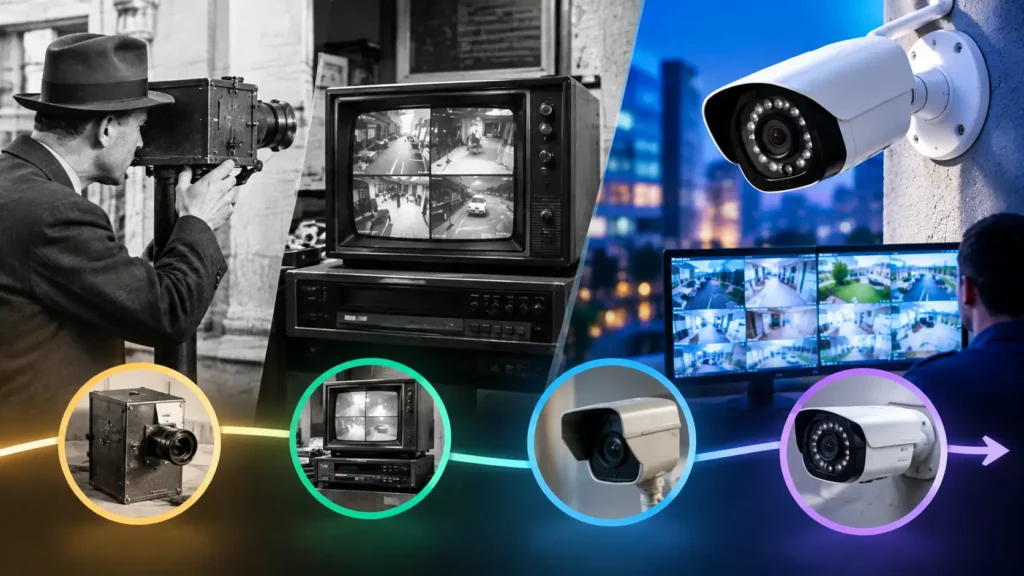
Surveillance cameras aren’t a recent invention dressed up in a sleek app. The earliest closed circuit systems date back to the 1940s. Originally built to monitor rocket launches rather than front porches.
Home-friendly versions didn’t arrive until decades later, once wireless technology and affordable digital storage made small, battery powered cameras practical for everyday households. Understanding that history helps explain why today’s smart cameras feel so far ahead of the clunky wired systems many people still associate with surveillance.
By the 1990s, camera prices had dropped enough for small businesses to install basic systems. But true consumer adoption for private homes didn’t take off until WiFi and cloud storage matured in the 2010s. That shift turned a niche commercial tool into something nearly any household could set up in an afternoon.
Comparing Popular Camera Categories
| Camera Category | Typical Power Source | Best Use Case |
| Wired indoor camera | Direct outlet power | Living rooms, hallways |
| Battery outdoor camera | Rechargeable battery | Entry points, driveways |
| Solar-assisted camera | Solar panel plus battery | Remote areas with no nearby outlet |
| Video doorbell | Hardwired or battery | Front door monitoring |
Where Arlo Smart Security Cameras Fit In
Among the wireless outdoor options, arlo smart security cameras have built a reputation for combining sharp video quality with genuinely flexible placement. Since many models skip the wiring entirely and run on rechargeable battery packs.
That flexibility appeals to renters and homeowners alike, since a battery powered camera can move with you or get repositioned the moment you realize your real mounting spot missed half outdoor area.
That said, no single brand fits every situation perfectly. Renters juggling frequent moves often lean toward battery only models for easy removal, while homeowners planning to stay put for years sometimes prefer wired options that never need a recharge cycle.
Indoor Versus Outdoor Cameras For Security At Home
Choosing the right mix of cameras for security at home starts with mapping out which areas actually need eyes on them. Entry points deserve priority, followed by any room that’s central to daily traffic.
Bedrooms and bathrooms are the clear exception. Beyond the obvious privacy concerns, several countries have specific legal restrictions on recording in those spaces, so it’s worth searching local law before mounting a camera anywhere near them.
Shared spaces like garages and mudrooms often get overlooked, even though they’re common entry points for anyone trying to access a home unnoticed. Adding coverage there closes a gap that a front door only setup tends to miss entirely.
Indoor Vs Outdoor Cameras At A Glance
| Factor | Indoor Camera | Outdoor Camera |
| Weather resistance needed | No | Yes, IP65 or higher recommended |
| Typical power source | Plug-in | Battery or solar |
| Common placement | Living room, hallway, entryway | Front door, driveway, backyard |
| Privacy considerations | Avoid bedrooms and bathrooms | Avoid neighboring property views |
Installation Tips That Save Headaches Later
Most modern cameras walk you through setup inside their companion app, but a few habits make the difference between a smooth install and a frustrating afternoon.
Test your Wi-Fi signal strength at the exact mounting spot before committing to adhesive or screws, since even a strong router signal can weaken significantly once it has to pass through brick or metal siding. Angling the camera slightly downward toward foot traffic rather than straight out toward the street, also tends to reduce meaningless alerts from passing cars.
A mesh Wi-Fi extender or a dedicated camera hub can solve range issues without forcing a full router upgrade which is often the cheaper fix compared to buying a completely different camera brand hoping for better connectivity. Labeling each camera clearly inside its app also saves confusion later, especially once a household grows past two or three devices.
How Your Setup Gets Undermined
A surprising number of homeowners install a camera once and never revisit its angle, even after weeks of blurry or useless clips. A five minute adjustment after the first few days usually fixes this.
Skipping the subscription for cloud storage is another frequent misstep. Free local storage works fine until the camera itself gets stolen or damaged, at which point that stored footage disappears along with any chance of identifying who was responsible.
Ignoring firmware updates ranks high on the list too. Manufacturers regularly patch security vulnerabilities and a camera running outdated software becomes an easier target for the exact kind of digital intrusion it was supposed to help prevent.
Extending Your Camera Beyond Just Watching
Pairing a camera with a voice assistant or smart display adds convenience that’s easy to underestimate until you’ve actually used it. Pulling up a live feed with a simple voice command beats fumbling for your phone during a moment that actually matters.
Integration also extends to smart locks and lighting. A camera that can trigger porch lights the moment it detects motion does double duty as both surveillance and a deterrent, since most intruders prefer targets that stay dark and unnoticed.
DIY Monitoring Or Letting Professionals Take Over
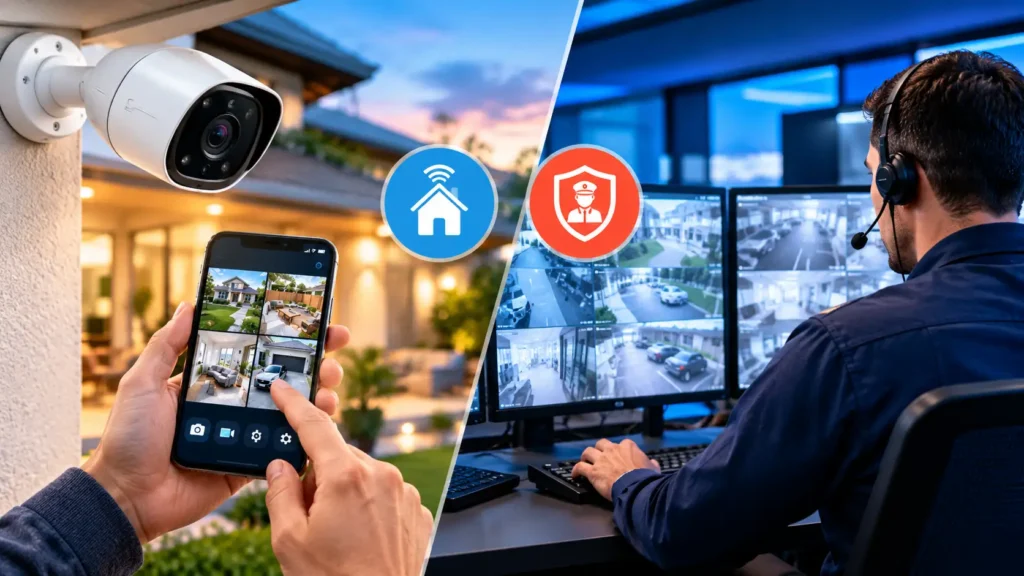
| Factor | Self-Monitoring | Professional Monitoring |
| Monthly cost | Usually free or low cost | Typically $10 to $60 per month |
| Response time | Depends on you noticing the alert | Trained staff respond immediately |
| Best suited for | Budget conscious, hands-on households | Frequent travelers, added peace of mind |
| App dependency | High, alerts go straight to your phone | Lower, monitoring center handles escalation |
Final Thoughts
A home doesn’t need a fortress level setup to feel genuinely protected, Just a security camera placed thoughtfully and matched to how you actually live. Start with your most vulnerable entry point, build outward from there and you’ll trade that nagging uncertainty for real everyday confidence.
FAQs
How many security cameras does an average home need?
Most homes do well with two to four cameras covering the main entrance, driveway and any secondary doors. Larger properties or homes with multiple entry points may need additional coverage but quality placement usually matters more than sheer quantity.
Do security cameras need Wi-Fi to work?
Not always. Many cameras rely on WiFi for live streaming and app alerts but some models record locally to an SD card or hard drive which works well in homes without reliable internet access.
Do I need a wifi wireless security camera or will a wired one work better?
A wifi wireless security camera offers easier installation and flexible placement without drilling or running cables. Wired options provide constant power and a more stable connection, so the right choice depends on whether you prioritize flexibility or uninterrupted reliability.
What should I look for in a security camera app?
A good security camera app should offer fast live streaming, clear push notifications and simple controls for arming or disarming your system remotely. Look for apps with customizable activity zones and easy access to both local and cloud stored footage.