
IIf you’ve ever tried to open or install an MSIX package on anything other than a Windows machine, you already know the frustration. Most guides assume you’re sitting in front of Windows 10 or 11 but that’s not always the case for developers and IT admins or curious users on Mac and Linux. This is where finding software that downloads MSIXbundle files that’s not Windows becomes genuinely useful.
MSIXbundle files were built by Microsoft for Windows app distribution. But the underlying file structure is far more flexible than most people realize. Once you understand how these files are packaged. Working with them outside a Windows environment becomes much easier.
What an MSIXbundle File Actually Contains
An MSIXbundle is a container that holds multiple MSIX packages inside one file. Each package inside targets a different system architecture such as x86, x64 or ARM. Windows uses this bundle to install only the files a specific device actually needs.
The important detail is the format itself. An MSIXbundle uses PKZip-based compression, the same compression method used by standard ZIP files. That single fact opens the door to cross platform tools that were never designed with Windows in mind.
Microsoft’s own numbers back up why the format is worth understanding. The company reports MSIX delivers roughly a < cite index=”24-1″>99.96 percent install success rate across millions of installs on Windows,</cite> with a guaranteed clean uninstall. Enterprise adoption of the format has been slower and more uneven. Though that is one reason so many packages still land in the hands of people without a Windows machine on hand.
Why Non-Windows Users Keep Hitting This Wall
Not everyone doing app packaging work has a Windows machine on hand. Mac users testing app deployments, Linux-based developers inspecting package contents and IT teams auditing files before deployment all run into the same wall.
Since MSIX installation itself is tied to the Windows App Installer, no tool on macOS or Linux can fully install these packages the way Windows does. What non-Windows software can do instead is open, extract, inspect and download the contents. Which covers most real world use cases outside actual installation.
Software That Cracks Open MSIXbundle Files Outside Windows
Several archive and file management tools built for macOS and Linux can open and extract MSIXbundle files. You don’t need a Windows license or virtual machine to do it. These tools treat the bundle as a compressed archive rather than an installable app package.
Proven cross-platform archive tools worth trying
| Tool | Platform | Best for |
| The Unarchiver | macOS | Fast, no-frills extraction of ZIP-based formats |
| Keka | macOS | Extraction plus repacking and format conversion |
| p7zip | macOS, Linux | Command-line extraction and scripting |
| Archive Manager | Linux | Built-in GUI extraction on most distros |
| PeaZip | Linux, Windows | Wide format support with a visual file browser |
| unzip (CLI) | Linux, macOS | Quick, scriptable extraction with no install overhead |
Once extracted, you get access to the individual MSIX packages, the AppxBundleManifest.xml file and any resource files bundled inside. This lets you review package contents, verify architecture targets or pull files for testing before ever touching a Windows machine.
Where these tools truly shine
- Inspecting the AppxBundleManifest.xml to check identity, publisher and version details
- Extracting individual MSIX packages for architecture-specific testing
- Verifying resource files and language packs before deployment
- Downloading and archiving bundle contents for documentation or auditing
- Preparing files for later installation on a separate Windows test device
These use cases cover most of what developers and IT teams actually need when they don’t have immediate Windows access.
Extraction Tools Versus Full Installation Compared
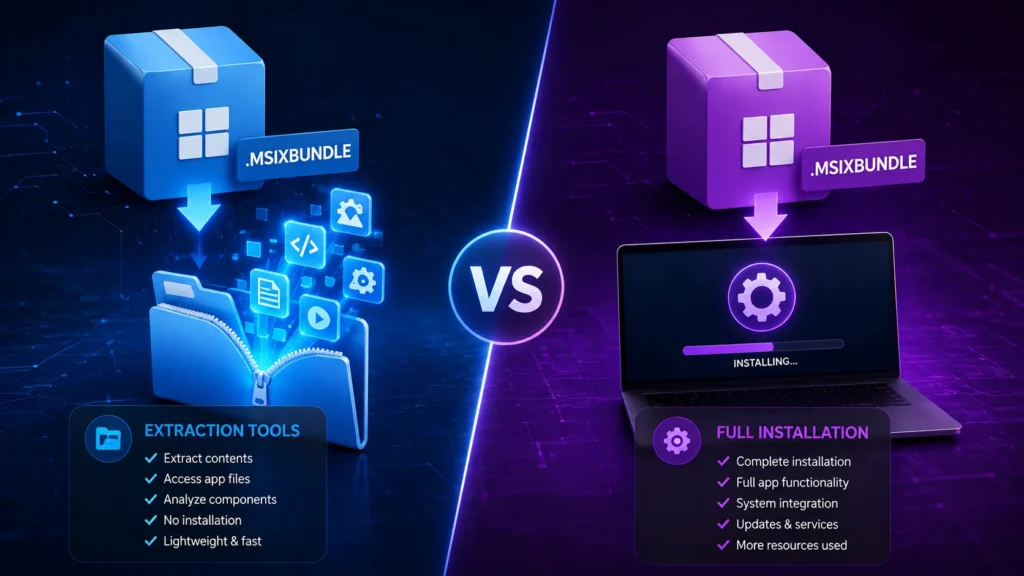
Understanding the difference between opening a file and installing it matters a lot here. The table below breaks down what non Windows tools can and cannot do.
| Task | Non-Windows Archive Tools | Windows App Installer |
| Extract file contents | Yes | Yes |
| View manifest data | Yes | Yes |
| Pull individual MSIX packages | No | Yes |
| Fully install the application | No | Yes |
| Run the app after extraction | No | Yes |
| Verify digital signature validity | Limited | YesYes |
This comparison makes one thing clear: extraction and installation are two separate processes and only Windows handles the second one natively.
How to Extract an MSIXbundle on Mac or Linux
Getting into an MSIXbundle file without Windows is straightforward once you have the right archive tool installed.
First, rename the file extension from .msixbundle to .zip. Most archive tools recognize ZIP-based formats instantly once the extension matches. Next, open the renamed file using your preferred archive utility. Whether that’s Keka on macOS or PeaZip on Linux.
After extraction, you’ll see a folder structure containing separate MSIX files and the manifest documents. From there, you can open individual MSIX packages the same way. Since they follow the identical PKZip structure.
Downloading From Third-Party Sources the Smart Way
Downloading MSIXbundle files always deserves a bit of caution, especially when installing unfamiliar software such as FreeDoor2.4.6.8. Only pull files from verified publisher websites or trusted repositories nor than random file sharing links.
This caution isn’t theoretical. In May 2026, attackers compromised the official JDownloader website and swapped the Windows and Linux installer links with malware. The team caught the breach after about a day and restored clean links. Separately, security researchers at Malwarebytes flagged dozens of lookalike download sites in August 2026 that showed a legitimate looking link on hover but redirected visitors to a different and unrelated installer entirely. AI tools have become a favorite disguise too, with fake installer pages impersonating well known AI products to trick both developers and everyday users into running malicious commands.
Signs a download source deserves extra scrutiny
| Warning sign | What it usually means | What to do instead |
| Link text and destination don’t match on hover | Redirect script is hijacking the click | Copy the visible URL and paste it manually |
| Publisher name in the manifest doesn’t match the vendor | File may have been repackaged or swapped | Cross check against the vendor’s official site |
| File was found via ad, forum post, or file-sharing link | Higher odds of a bundled or fake installer | Go directly to the publisher’s domain |
| No digital signature, or signature from an unfamiliar company | Signing doesn’t guarantee safety, but its absence is a flag | Treat as unverified until confirmed |
| Site pressures you to disable antivirus or run a command | Common social-engineering step before payload delivery | Stop and verify through another channel |
Checking the publisher information inside the manifest file after extraction gives you a quick way to confirm the source. It should match what you expected. This step matters even more when you can’t rely on Windows SmartScreen or built-in signature checks to flag something suspicious.
Limitations You Cannot Ignore
Non-Windows tools are genuinely useful but they come with clear boundaries. You cannot run the actual application, and you cannot rely on these tools to validate digital signatures the way Windows does during installation.
If your end goal is running the app itself, you’ll eventually need a Windows environment, especially when working with Windows-based software such as EdSim51 in Win 10. Whether that’s a physical machine, a virtual machine or a cloud-based Windows instance. Extraction tools are a bridge for inspection and preparation work not a full replacement for the Windows installation process.
Smart Practices for Cross-Platform MSIX Work
Keeping a consistent workflow saves time when you regularly work with MSIX files outside Windows. Set up a dedicated folder structure for extracted packages. So you’re not hunting through downloads every time.
Document the source and publisher details for every file you extract. Especially if you plan to share findings with a team. This habit becomes valuable fast when you’re auditing multiple packages across different projects including software installation projects such as How to Install Wangofan.
Final Thoughts
Working with MSIX packaging doesn’t have to stop just because you’re away from a Windows desktop. Understanding the PKZip structure behind these files means software that downloads MSIXbundle files that’s not Windows can still get you most of the way there, covering extraction, inspection and preparation with ease. When it comes time to actually install and run the application, a Windows environment remains the final step but everything leading up to that point is well within reach on Mac and Linux systems.
FAQs
How do I install an MSIXbundle file in Windows 10?
Double clicking the .msixbundle files to open it with App Installer. Then click to Install. If double click have not work then open PowerShell as administrator and run Add AppxPackage Path followed by the file path. Windows 10 version 1809 or later give the best MSIX bundle supports.
How do I install an MSIXbundle file in Windows 7?
Windows 7 have not supports the MSIX format natively. Since MSIX require Windows 10 version 1709 or may be later. There have no official Apps Installers or PowerShell cmdlet for MSIX on Windows 7. So upgrad to Windows 10 or 11 has required to install these files.
What is an MSIXbundle installer?
An MSIXbundle installer refers to the Windows App Installer. The built in tool that reads .msixbundle files and installs the correct package for a device’s architecture. It handles signature verification, dependency checks and installs automatically when a user double clicks the file.
How do I install an MSIXbundle file in Windows 11?
Double click the .msixbundle file and App Installer will be launch automatically. It showing an Install button. For command lines installation open PowerShell as administrator and run Add AppxPackage Path with the files locations. Windows 11 supports MSIX bundle fully out of the box.